OTP not delivered? A troubleshooting checklist for Indian SMS routes
· Updated · 9 min read · The SMSAPI team
An OTP usually goes undelivered for one of three reasons: it was dropped at DLT scrubbing before reaching the operator (template drift, a promotional header, or a template not active on the route), the network or handset couldn't receive it, or it was delivered but the user never saw it. The delivery receipt tells you which one you're dealing with.
An undelivered OTP is the most expensive SMS you never sent. The user is sitting on your verification screen, the code isn't coming, and every second of that wait is a signup or a payment deciding whether to abandon. When it happens at scale, support tickets say "not receiving OTP" and little else.
The good news: most of these causes are diagnosable from data you already have. Here's the checklist, ordered by where the message dies.
Start with the delivery receipt, not the guess
Before changing anything, look at what the route actually reported. Every send through an OTP API produces a status trail — accepted, submitted to operator, delivered, or failed with a reason — surfaced as a webhook or a status endpoint. The OTP quickstart shows where the delivery status lives in the flow.
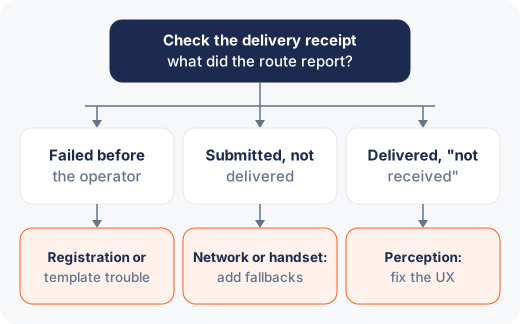
The first diagnostic split is simple:
- Failed before the operator — the message never left the platform. This is almost always registration or template trouble, and it's fixable on your side today.
- Submitted but not delivered — the operator accepted it and the handset didn't confirm. This is the network/handset bucket, and it's about fallbacks, not fixes.
- Delivered but "not received" — the receipt says delivered and the user says otherwise. This is the perception bucket, and it's about UX.
Each bucket has its own checklist.
Bucket 1: why do OTPs fail at DLT scrubbing?
Under DLT, every message is checked against your registered headers and templates before it goes anywhere. OTPs die here for three predictable reasons:
The content drifted from the template. The registered template says one thing; your code sends a slightly different thing — a reworded sentence, a moved variable, different punctuation. The scrubber drops it. Diff your actual send string against the registered template character by character; "basically the same" is not the standard.
The header category is wrong. OTPs are service traffic. If they're going out on a promotional header, they inherit promotional rules — blocked for DND subscribers, held to permitted hours — which for an OTP means effectively random non-delivery. If you see OTP failures correlated with specific recipients or specific times of day, check the header category first. The category system is laid out in the DLT guide.
The template or header isn't active on the route. A template approved on the DLT portal still has to be known to the route you're sending through. New templates, recently edited templates, and second-operator registrations are the usual suspects.
Everything in this bucket shows up as a failure code before operator submission, which is why reading the receipt comes first.
Bucket 2: the network or the handset
Once the operator accepts the message, the remaining failures are physical-world problems:
- Handset off or out of coverage. The operator retries for a validity period, but an OTP is stale long before a retry window closes.
- Storage or inbox limits on older handsets — rarer now, still real on the long tail of devices.
- On-device spam filtering. Android's messaging apps classify aggressively, and an OTP from a new sender occasionally lands in the spam tab. Users don't look there.
- Roaming and international numbers. A +91 flow that suddenly needs to reach a traveller abroad behaves differently; if you support international users, that's its own route and its own testing.
You can't fix a switched-off phone, so this bucket is about designing around it: a visible resend control after a short wait, and a fallback channel. The strongest fallback is a voice OTP — the same code read out by an automated call — because voice reaches a handset that has signal but a clogged or filtered SMS inbox, and it reassures the user in a way a second silent SMS doesn't.
Bucket 3: why does a delivered OTP go unseen?
When receipts say delivered and users disagree, believe both of them. The message arrived at the device; the user didn't see it. Common causes:
- The notification was swiped away or never shown because the messaging app's notifications are muted.
- The message landed in a filtered tab.
- The user is on the verification screen waiting for autofill that never triggers, not realising the code is sitting in their inbox.
The engineering answer is to remove the human step where possible. On Android, the SMS Retriever flow fills the code without the user touching their inbox; the auto-read setup covers the message format and app hash it needs. On iOS and the web, AutoFill suggestions get most of the way there. And in all cases, the verification screen should say what to do when nothing arrives — a countdown, then a resend control, then a "get the code by call instead" option, in that order.
Which OTP metrics should you monitor?
Single-send debugging finds today's bug. Instrumentation finds next month's regression before users do. The metrics worth tracking, each segmented by operator, template, and time of day:
- Submission failure rate — spikes mean a template or header just broke, often after someone "improved" the message copy.
- Delivery rate and time-to-delivery — a drift in latency on one operator is invisible per-send and obvious on a chart.
- Send-to-verify completion rate — the metric that actually matters. Delivery can be fine while completion drops because autofill broke in an app release.
- Fallback usage — rising voice-fallback share is an early warning that SMS delivery is degrading somewhere specific.
Alert on completion rate, not delivery rate. Users experience the funnel end to end, and so should your monitoring.
Reproduce in test before you touch production
When the cause isn't obvious from receipts, resist the urge to debug by changing production settings. A test API key against the same endpoints lets you replay the exact send — same template ID, same header, same variable values — and watch where it stalls without burning real traffic or real users. Most template-drift bugs reproduce on the first test send once you compare the string your code actually built against the registered text, and the diff is usually a single character someone "fixed" in a copy review. Keep one canary check in staging that sends and verifies a real OTP end to end on every deploy; it turns "the template broke on Tuesday" into a failed build instead of a Thursday incident.
Symptoms, causes and checks at a glance
| Symptom | Likely cause | What to check |
|---|---|---|
| Receipt shows failed before operator submission | Sent content drifted from the registered template | Diff the sent string against the registered template character by character |
| Failures cluster by recipient or time of day | OTP sent on a promotional header, so DND and permitted-hours rules apply | Confirm the OTP goes out on a service header |
| New or recently edited template fails pre-operator | Template or header not yet active on the route | Confirm template and header are active on the route you send through |
| Submitted but not delivered | Handset off or out of coverage, inbox limits, spam filtering, or roaming | Look for patterns by operator, region and time; confirm resend and voice fallback work |
| Delivered but the user says it never arrived | Muted notifications, a filtered tab, or autofill that never triggered | Verify auto-read on the latest app build and that the screen offers resend and call-me options |
| Delivery steady but verification completion drops | Autofill broke in an app release | Track send-to-verify completion rate by operator, template and time of day |
| Voice-fallback share rising | SMS delivery degrading somewhere specific | Segment fallback usage by operator, template and time of day |
The checklist, in order
When "OTP not delivered" lands in your queue:
- Pull the delivery receipt for the affected sends. Failed, submitted, or delivered?
- If failed pre-operator: diff the sent text against the registered template; confirm the header is a service header; confirm template and header are active on the route.
- If submitted-not-delivered: check for patterns by operator, region, and time; confirm the resend and voice-fallback paths actually work; don't burn hours on individual handsets.
- If delivered-but-unseen: verify auto-read is functioning on the latest app build and the screen offers resend and call-me options.
- Whatever the cause, check the funnel dashboard for when the metric moved and what shipped that day.
The short version
OTP non-delivery is three different problems wearing one support ticket. Pre-operator failures are DLT problems — template drift, wrong header category — and they're entirely yours to fix. Post-operator failures are physics, answered with resend and voice fallback rather than root-causing every handset. Delivered-but-unseen is UX, answered with auto-read and an honest verification screen. Read the receipt first, instrument completion rather than delivery, and most "OTP not delivered" tickets become a chart you saw move before the user felt it.