Delivery reports explained: what DLR statuses actually mean
· Updated · 7 min read · The SMSAPI team

An SMS delivery report (DLR) tells you how far down the delivery chain a message got. SUBMITTED means the API accepted it, SENT means the operator accepted it, DELIVERED means the handset acknowledged receipt, and FAILED, EXPIRED or REJECTED mean it didn't arrive. No status tells you whether the message was read.
A delivery report is the only evidence you get that a message arrived. It is also the most misread field in any SMS integration. Teams treat SENT as success, DELIVERED as proof the customer read something, and FAILED as a provider problem — and all three readings cause real damage, usually at the worst possible moment.
Here is what each status means in the Indian SMS chain, what it deliberately does not tell you, and how to write code that responds to the difference.
The chain a message travels
Four parties touch every SMS you send, and each one reports back separately:
- Your application calls the API.
- The platform validates the request against DLT records — principal entity ID, registered sender ID, approved template — and hands it to an operator route.
- The operator (Airtel, Jio, Vi, BSNL) accepts the message and attempts delivery to the handset.
- The handset acknowledges receipt, and that acknowledgement travels back up the chain.
A status code tells you how far down that chain the message got. It does not tell you what happened after, and it never tells you what the recipient did.
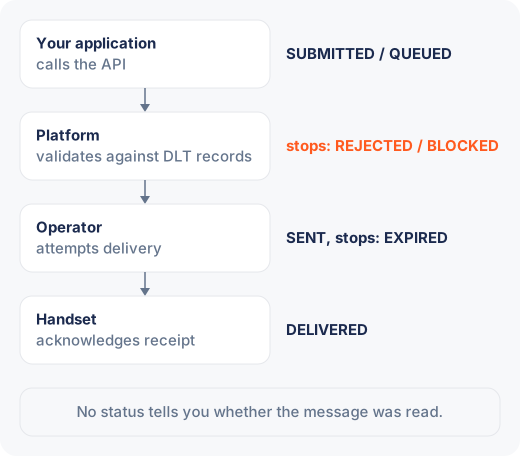
What does each SMS delivery status mean?
SUBMITTED / QUEUED. The API accepted the request. Nothing has left the platform yet. This is a receipt for your HTTP call, not for the message. If a message sits here for more than a few seconds, the issue is almost always throttling on your account or a queue behind a scheduled campaign.
SENT. The operator accepted the message and is attempting delivery. This is the status most dashboards show as a green tick, and it is the one that misleads most. A message can sit in SENT and never arrive: the handset is off, out of coverage, or the operator is holding it in a store-and-forward queue that will expire quietly hours later.
DELIVERED. The handset acknowledged receipt. This is the strongest signal the protocol offers, and it stops at the handset. It says a device on that number received the bytes. It says nothing about whether the phone was unlocked, whether the message was read, or whether the number still belongs to the person you think it does.
FAILED. The message was rejected, with an error code attached. The code is the useful part and it splits into two very different families, covered below.
EXPIRED. The operator tried, and kept trying, until the validity period ran out. On Indian routes this window is typically measured in hours. For an OTP, an expiry is a failure that arrived far too late to matter; for a promotional campaign, it is a number worth revisiting on a different day.
REJECTED / BLOCKED. The message never reached an operator. DLT mismatch, unregistered sender ID, a template that does not match the content, or an NDNC-listed number on a promotional route. These are compliance outcomes, not network outcomes.
Should you retry a failed SMS?
The single most useful thing you can do with a delivery report is sort failures by who can fix them.
Permanent failures belong to the recipient or the regulation: an invalid number, a number that no longer exists, a DND registration on a promotional route, a DLT rejection. Retrying these burns money and changes nothing. The right response is to mark the record, stop sending to it, and surface it to whoever owns the customer data.
Temporary failures belong to the network: handset off, out of coverage, an operator queue that expired, a route-level timeout. These are worth one retry, on a different schedule, and sometimes on a different channel.
In practice that means your webhook handler branches on the error code before it branches on anything else:
app.post("/webhooks/sms-dlr", (req, res) => {
  const { messageId, status, errorCode } = req.body;

  if (status === "DELIVERED") {
    markDelivered(messageId);
  } else if (PERMANENT_CODES.has(errorCode)) {
    suppressNumber(messageId);          // never send here again
  } else if (status === "EXPIRED" || TEMPORARY_CODES.has(errorCode)) {
    scheduleRetry(messageId, { after: "2h", channel: "voice" });
  }

  res.sendStatus(200);                  // always ack, or you get redelivered
});
Two details in that handler matter more than they look. Acknowledge with a 2xx before you do slow work, or the platform will redeliver the same report and your counters will drift. And key everything on the message ID rather than the phone number, because a single number can have several messages in flight.
| Status | What it means | What to do |
|---|---|---|
SUBMITTED / QUEUED | The API accepted the request; nothing has left the platform | If it sits here more than a few seconds, check account throttling or a scheduled campaign queue |
SENT | The operator accepted the message and is attempting delivery | Treat it as in transit, not as success |
DELIVERED | The handset acknowledged receipt | Mark it delivered; it doesn't mean the message was read |
FAILED (permanent) | Invalid or non-existent number, DND on a promotional route, or a DLT rejection | Stop sending to the number and flag the record |
FAILED (temporary) | Handset off, out of coverage, or a route-level timeout | Retry once, on a different schedule or channel |
EXPIRED | The operator kept trying until the validity period ran out | Retry once like a temporary failure |
REJECTED / BLOCKED | Never reached an operator: DLT mismatch, unregistered sender ID, template mismatch or NDNC number | Fix the compliance cause, starting with content against the template |
What can't a delivery report tell you?
Whether the message was read. SMS has no read receipt. Anyone quoting an open rate for SMS is inferring it from clicks on a link, which is a different measurement with a different denominator.
Whether the content was correct. A message with a broken merge field delivers exactly as cleanly as a correct one. DELIVERED on a template that rendered Dear {name} is still a delivery.
Why a DLT rejection happened. The status tells you it was rejected; the error code narrows it; the content-versus-template comparison is what actually resolves it. Variable length limits and stray whitespace cause more of these than genuine content mismatches. Our notes on DLT template rejection reasons go through the common ones.
How long delivery took. Unless you record the timestamp on both the send and the report, the status alone carries no latency information. Store both. The gap between them is the number you will want the first time someone says OTPs feel slow.
Instrument it once, read it forever
Three fields, stored at send time and updated on the webhook, answer almost every question a support ticket will ever ask: message ID, status with its error code, and the two timestamps. Aggregate them by route and by hour, and patterns that look like mysteries resolve into ordinary infrastructure — one operator degrading between 9pm and midnight, one sender ID rejecting since a template edit, one contact list that has been failing permanently for a month.
Delivery reports are not a scoreboard. They are a diagnostic feed, and they are most useful when your code reads them at the moment they arrive rather than when someone asks for a report.
Ready to wire this up? The bulk SMS API documents the webhook payload and the full error-code list, and OTP delivery covers the retry and voice-fallback pattern for verification traffic specifically. Pricing for both, with GST broken out, is on the pricing page.