Why DLT templates get rejected, and how to write ones that pass
· Updated · 10 min read · The SMSAPI team
A DLT template usually gets rejected for one of five mismatches: the content doesn't match its category, the variable syntax is wrong or the template is mostly variables, nothing ties the text to your brand, the header and template don't belong together, or it contains links a reviewer can't trust. Most are fixable in one resubmission.
You registered your entity, you got your headers approved, you submitted your first content templates — and a few came back rejected, with a reason code that explains less than you'd hope. This is one of the most common stalls in getting live on SMS in India.
If you're earlier in the process than this, start with the DLT registration guide — this article assumes your entity and headers exist and it's the templates that are stuck.
What are DLT reviewers actually checking?
The mental model that prevents most rejections: a DLT content template is a contract between your business and the operators about exactly what a given message will say. The fixed text is fixed. The variables — written as {#var#} — are the only parts that change at send time. Reviewers are deciding whether that contract is specific enough to hold you to, and whether it matches the category and header you filed it under.
Most rejections are one of five mismatches.
Reason 1: the category doesn't match the content
Every template is filed under a category — transactional, service implicit, service explicit, or promotional — and the content has to read like its category. The classic failure is marketing language inside a service template: a delivery notification that ends with "Shop again for 20% off" is no longer a service message, and a reviewer will bounce it rather than let promotional content ride a route that reaches DND numbers.
The fix is discipline, not cleverness. Service and transactional templates carry only what the customer needs to know about the thing they already did. Anything that invites a purchase belongs in a promotional template, sent on a promotional header within permitted hours. The split is explained in more depth in transactional vs promotional SMS, and it's the single highest-value thing to get right, because miscategorised templates don't just get rejected — the ones that slip through get your header flagged later.
Reason 2: variable syntax, and the all-variable template
Variables must use the exact {#var#} syntax. Home-grown placeholders — [name], <otp>, %s — are read as literal fixed text, which either fails review or, worse, passes and then never matches what you actually send.
The opposite mistake also fails: templates that are essentially one giant variable. Dear customer, {#var#} is a blank cheque, and reviewers treat it as one — there's no contract left to approve. The same goes for stacking several variables back to back with no fixed text between them. Operators have tightened on this pattern, so write templates where the fixed text carries the meaning and variables carry only the specifics: a name, an amount, an order ID, a date, a short link.
A useful rule of thumb: a stranger reading the template with the variables blanked out should still be able to say what the message is about, who it's from, and why the recipient is getting it.
Typed variables: the pre-tagging rules, live since January 2026
Since the pre-tagging rollout, a bare {#var#} is no longer enough on its own. Operators now expect each variable to declare its type, and they validate the value you send against that type at scrubbing time. The change comes from a TRAI direction dated 18 November 2025 under the TCCCPR, 2018: typed variables are mandatory for new templates registered from 15 January 2026, and existing templates are being brought into line after that. It is live across the major DLT operators, including VilPower, SmartPing, Jio, Airtel, Tata and BSNL. A template approved before the cutover keeps working until you next edit it, but anything you register now should use the typed form.
There are six types, each with a length ceiling:
{#numeric#}: digits only, for OTPs, amounts and counts. Up to 40 characters. Example348954.{#alphanumeric#}: letters and digits, for reference IDs and short addresses. Up to 40 characters. ExampleSR3852PW.{#url#}: a website or tracking link. Up to 40 characters. Examplehttps://example.in/o/283.{#urlott#}: an app, OTT or WhatsApp link. Up to 40 characters. Examplehttps://wa.me/91XXXXXXXXXX.{#cbn#}: a callback or support number, no special characters. Up to 12 characters. Example18004104433.{#email#}: an email address. Up to 40 characters. Example[email protected].
The failure the generic tag used to hide is a type mismatch: declare {#numeric#} and then send OTP 348954, with letters alongside the digits, and the message is dropped at scrubbing while your side simply records a delivery failure with no reason attached. Pick the narrowest type that fits the value, keep each value inside its ceiling, and generate messages from the registered template so what you send always matches what you typed.
Reason 3: nothing ties the template to your brand
Reviewers look for a connection between the template text and the entity that filed it. A template with no brand name anywhere — Your appointment is confirmed for {#var#} — could belong to anyone, and anonymous templates are how spam historically moved. Including your brand name in the fixed text (Your Mehta Clinic appointment is confirmed for {#var#}) gives the reviewer the link they're looking for and gives the recipient a reason not to report the message.
This also matters at the trust level: the header is six characters of approval; the brand name in the body is what a human actually recognises.
Reason 4: the header and template don't belong together
Templates are approved against headers, and the pairing has to make sense. Filing a promotional template against a transactional header, attaching a template to a header registered under a different entity, or sending on a header the template was never linked to — each of these fails, either at review or at the scrubbing stage when you try to send.
Keep an internal register that maps each template ID to its header, its category, and the message it implements. Teams that treat template IDs as configuration — versioned, documented, owned — almost never hit this class of rejection. Teams that keep them in a spreadsheet someone left behind do. The DLT registration walkthrough covers how headers and templates relate if the structure is new to you.
Reason 5: links and contact details reviewers can't trust
Templates containing URLs, phone numbers, or suspicious-looking shortened links get extra scrutiny, because link-bearing SMS is where phishing lives. Generic public URL shorteners are a particular problem — the reviewer can't see where the link goes, and operators have moved toward requiring the URLs you send to be declared and matched to your entity.
Practical guidance: use your own domain in links, keep the link in the fixed text or declare the destination, and don't put a different brand's domain in your template. If a callback number appears, it should be one that's plausibly yours.
Why does an approved template still fail at send time?
A template that passed review can still fail in production, because every message you send is scrubbed against the registered text. If the message doesn't match — extra words, reordered sentences, punctuation that wandered, a variable used to smuggle in an unregistered sentence — the message is dropped at scrubbing, and from your side it just looks like delivery failed.
Two habits prevent drift. First, generate messages from the registered template programmatically rather than re-typing them in each campaign. Second, treat variables as data slots, not prose slots: filling {#var#} with two sentences of marketing copy is the same category violation as Reason 1, enforced at send time instead of review time.
How do you write a DLT template that passes first time?
Putting it together, the process that reliably clears review:
- Write the final message first, exactly as a customer should receive it, with realistic values in place.
- Carve the variables out of that finished message — only the parts that genuinely change per recipient — and replace them with
{#var#}. - Check the category by asking what triggered the message. Something the customer did → transactional or service. Something you want the customer to do → promotional.
- Name your brand in the fixed text.
- Pair it with the right header, registered to the same entity and the same category.
- Submit language variants as their own templates — the Hindi version is a separate registration, not a variable.
- Record the template ID against the code path or campaign that will use it, so what you send is always generated from what was approved.
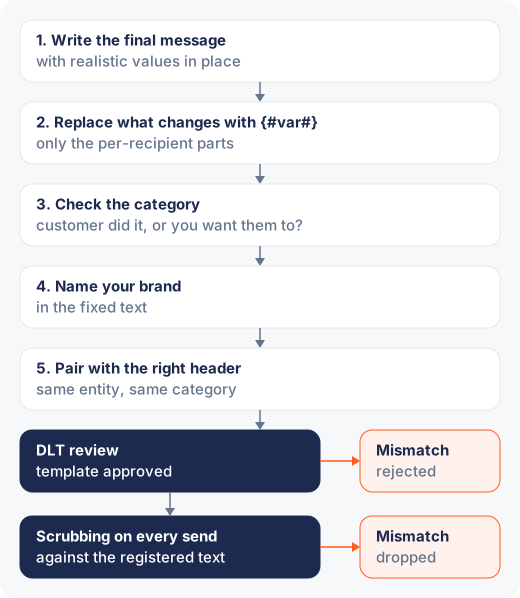
Review timelines vary by operator and load, so batch your submissions: register the whole message catalogue for a product launch at once rather than one template per day as you discover you need them.
Rejection reasons and fixes at a glance
| Reason | What goes wrong | Fix |
|---|---|---|
| Category mismatch | Marketing language inside a service or transactional template | Keep service templates to what the customer needs to know; put offers in a promotional template on a promotional header |
| Wrong variable syntax | Placeholders like [name], <otp> or %s are read as literal fixed text | Use the exact {#var#} syntax, or the typed form for new templates |
| All-variable template | Dear customer, {#var#} or variables stacked with no fixed text between them | Let the fixed text carry the meaning and variables carry only the specifics |
| Variable type mismatch | A value that doesn't fit its declared type, such as OTP 348954 in a {#numeric#} slot, is dropped at scrubbing | Pick the narrowest type that fits and keep each value inside its ceiling |
| No brand connection | No brand name anywhere in the fixed text | Name your brand in the fixed text |
| Header and template mismatch | Promotional template on a transactional header, or a header under a different entity | Pair the template with a header registered to the same entity and category |
| Untrusted links or numbers | Generic public URL shorteners or another brand's domain | Use your own domain and keep the link in the fixed text or declare the destination |
| Content drift at send time | The sent message no longer matches the registered text | Generate messages programmatically from the registered template |
The short version
Templates get rejected for five reasons: content that doesn't match its category, variable syntax that's wrong or does too much, no brand connection in the text, header pairings that don't add up, and links a reviewer can't trust. Write the real message first, carve minimal variables, name yourself, file it under the category the trigger implies, and send only what was approved. None of this is bureaucratic decoration — every check maps to a way recipients were historically spammed, and a template that passes cleanly is also, usually, a better message.